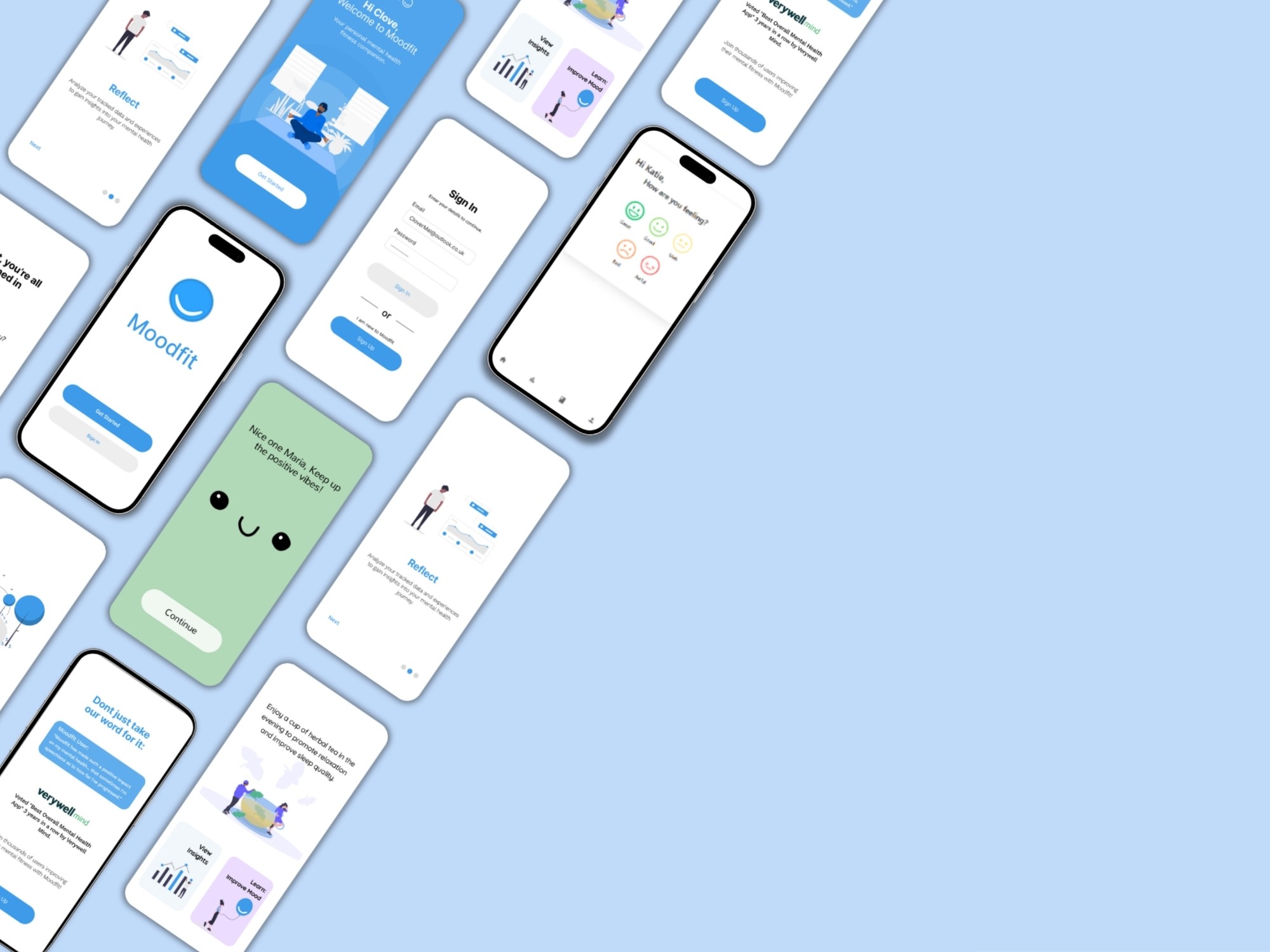
Moodfit Mental Health App

Human-Centred Redesign of a Mood-Tracking Application

Role:

UX Researcher & Full-Stack Developer

Timeline:

6 months (Msc Dissertation, 2024)

Tools:

Figma, React.js, Node.js, SQLite3

Overview

This MSc Computer Science dissertation project focused on enhancing user satisfaction and wellbeing through the redesign of Moodfit, a mood-tracking application by Roble Ridge Software LLC.

Using a human-centred design approach combined with agile methodologies, I addressed key challenges in user engagement and mental health support. The project included user research, iterative prototyping, and full-stack implementation using modern web technologies.

The redesigned app was evaluated using the System Usability Scale (SUS), heuristic evaluation, and A/B testing, demonstrating significant improvements in usability and engagement — achieving an 83.5 SUS score (up from 58.75).

The Problem

User Pain Points

  • Complex interfaces led to cognitive overload and reduced engagement

  • Lack of personalisation failed to address diverse user needs

  • Users found it difficult to derive meaningful insights from their mood data

  • Clinical, uninspiring visual design made the app feel like a chore

  • Existing mood-tracking apps struggled to maintain long-term user engagement


Business Goals

  • Increase user engagement and retention with mood-tracking features

  • Create a more intuitive and user-friendly interface for mood logging

  • Implement personalised features that support emotional well-being

  • Demonstrate measurable improvement in usability scores

User Personas

Jeremiah
30

Professional Worker - IT Analyst

High Tech Savviness

"I want quick mood logging that fits into my busy workday without interrupting my flow."

  • Current apps require too many steps to log a mood

  • Generic feedback doesn't feel relevant to professional stress

  • Data visualisation is confusing and not actionable

PAIN POINTS
  1. Track mood patterns efficiently during busy workdays

  2. Gain insights to manage work-related stress

  3. Use data to communicate better with therapist

GOALS
Kate
20

Student & part-time worker

Moderate Tech Savviness

"I want an app that feels engaging and supportive, not like a clinical tool."

  • Interface feels plain and uninspiring — compared to 'outdated software'

  • Lack of colour and engaging graphics reduces motivation

  • No distractions or engaging content to lift mood when feeling low

  • Generic feedback not tailored to personal needs

PAIN POINTS
  1. Track mood efficiently without feeling burdened

  2. Find an app that feels engaging rather than clinical

  3. Use mood tracking for self-reflection and personal growth

GOALS

Design Process

PHASE 6

Implement

Built the full-stack application using modern web technologies.

  • Developed React.js frontend with component-based architecture

  • Built Node.js/Express backend with SQLite3 database

  • Implemented mood tracker with emoji-based inputs

  • Created personalised results with colour psychology principles

PHASE 5

Test

Validated design decisions through rigorous user testing and evaluation.

  • A/B tested 3 mood-tracker page designs with 5 participants

  • Conducted SUS evaluation comparing original vs redesigned app

  • Performed heuristic evaluation against mental health app guidelines

  • Gathered qualitative feedback through verbal responses

PHASE 4

Prototype

Translated concepts into testable prototypes at multiple fidelity levels.

  • Created low-fidelity paper wireframes for rapid iteration

  • Developed mid-fidelity wireframes for A/B testing

  • Built high-fidelity interactive Figma prototypes

  • Iterated based on user feedback at each stage

PHASE 3

Ideate

Brainstormed creative solutions through structured ideation techniques.

  • Divergent thinking phase — generating ideas without judgment

  • Convergent thinking — evaluating feasibility and alignment

  • Mind mapping connections between components and user needs

  • Reverse thinking — considering opposite of conventional solutions

PHASE 2

Define

Created user personas and journey maps to articulate the core problems.

  • Developed 2 user personas representing target demographics

  • Created user journey maps visualising touchpoints and pain points

  • Constructed app map of original Moodfit information architecture

  • Conducted thematic analysis of qualitative user feedback

PHASE 1

Empathise

Gathered user insights through questionnaires, user testing, and app store review analysis.

  • Distributed questionnaires to 20 participants on mood-tracking preferences

  • Conducted user testing with Userbrain tool using think-aloud protocol

  • Analysed Google Play and App Store reviews for pain points

  • Performed competitive analysis of Daylio and Moodpath apps

PHASE 6

Implement

Built the full-stack application using modern web technologies.

  • Developed React.js frontend with component-based architecture

  • Built Node.js/Express backend with SQLite3 database

  • Implemented mood tracker with emoji-based inputs

  • Created personalised results with colour psychology principles

PHASE 5

Test

Validated design decisions through rigorous user testing and evaluation.

  • A/B tested 3 mood-tracker page designs with 5 participants

  • Conducted SUS evaluation comparing original vs redesigned app

  • Performed heuristic evaluation against mental health app guidelines

  • Gathered qualitative feedback through verbal responses

PHASE 4

Prototype

Translated concepts into testable prototypes at multiple fidelity levels.

  • Created low-fidelity paper wireframes for rapid iteration

  • Developed mid-fidelity wireframes for A/B testing

  • Built high-fidelity interactive Figma prototypes

  • Iterated based on user feedback at each stage

PHASE 3

Ideate

Brainstormed creative solutions through structured ideation techniques.

  • Divergent thinking phase — generating ideas without judgment

  • Convergent thinking — evaluating feasibility and alignment

  • Mind mapping connections between components and user needs

  • Reverse thinking — considering opposite of conventional solutions

PHASE 2

Define

Created user personas and journey maps to articulate the core problems.

  • Developed 2 user personas representing target demographics

  • Created user journey maps visualising touchpoints and pain points

  • Constructed app map of original Moodfit information architecture

  • Conducted thematic analysis of qualitative user feedback

PHASE 1

Empathise

Gathered user insights through questionnaires, user testing, and app store review analysis.

  • Distributed questionnaires to 20 participants on mood-tracking preferences

  • Conducted user testing with Userbrain tool using think-aloud protocol

  • Analysed Google Play and App Store reviews for pain points

  • Performed competitive analysis of Daylio and Moodpath apps

Research & Discovery

Methods Used
Icon

User questionnaires on well-being app preferences (n=20)

Icon

Heuristic evaluation against mental health app guidelines

Icon

A/B testing of mid-fidelity wireframes

Icon

System Usability Scale (SUS) evaluation

Icon

Thematic analysis of qualitative feedback

Icon

Remote usability testing with Userbrain (think-aloud protocol)

Icon

Competitive analysis of mood-tracking apps (Daylio, Moodpath)

5

Colour psychology (calming purples for low moods, warm oranges for positive) enhanced emotional connection

4

Personalised greetings and tailored responses significantly improved perceived value

3

Users in low mood states had reduced reading comprehension — content needed to be scannable

2

Text-free, emoji-based interfaces scored 8.7/10 for preference vs 5.2 for text-heavy designs

1

Mood tracking rated as the most important feature — users wanted quick, simple logging

Key Insights

5

Colour psychology (calming purples for low moods, warm oranges for positive) enhanced emotional connection

4

Personalised greetings and tailored responses significantly improved perceived value

3

Users in low mood states had reduced reading comprehension — content needed to be scannable

2

Text-free, emoji-based interfaces scored 8.7/10 for preference vs 5.2 for text-heavy designs

1

Mood tracking rated as the most important feature — users wanted quick, simple logging

Key Insights

Prototyping Journey

Stage 1
Low-Fidelity

Paper prototypes focusing on structure and flow without visual aesthetics — enabling rapid iteration and early user feedback.

Paper prototypes focusing on structure and flow without visual aesthetics — enabling rapid iteration and early user feedback.

Stage 2
Stage 2
Mid-Fidelity
Mid-Fidelity

Digital wireframes used for A/B testing of three mood tracker designs, isolating user preferences for layout and content density.

Digital wireframes used for A/B testing of three mood tracker designs, isolating user preferences for layout and content density.

Stage 3
High-Fidelity

Interactive Figma prototypes with full visual design, allowing realistic user testing before development.

Interactive Figma prototypes with full visual design, allowing realistic user testing before development.

Emoji-based mood logging instead of text-heavy forms

Rationale: A/B testing showed emoji-only Design B scored 8.7/10 vs 5.2/10 for multi-question design — reducing cognitive load per Sweller's cognitive load theory.

Personalised greetings and tailored feedback based on mood state

Rationale: Bandura's self-efficacy theory suggests personalised insights boost user confidence in managing emotions.

Colour-coded results screens (orange for positive, purple for low moods)

Rationale: Colour psychology research indicated warm colours energise while calming tones soothe users in vulnerable states.

Micro-learning 'Learn' section with swipeable bite-sized content

Rationale: Users preferred scannable information over long text blocks — aligns with mobile-first content consumption patterns.

Component-based React architecture for modular feature development

Rationale: Enabled rapid iteration and easy integration of sleep tracker using same patterns as mood tracker

Design Decisions

Design Decisions

Emoji-based mood logging instead of text-heavy forms

Rationale: A/B testing showed emoji-only Design B scored 8.7/10 vs 5.2/10 for multi-question design — reducing cognitive load per Sweller's cognitive load theory.

Personalised greetings and tailored feedback based on mood state

Rationale: Bandura's self-efficacy theory suggests personalised insights boost user confidence in managing emotions.

Colour-coded results screens (orange for positive, purple for low moods)

Rationale: Colour psychology research indicated warm colours energise while calming tones soothe users in vulnerable states.

Micro-learning 'Learn' section with swipeable bite-sized content

Rationale: Users preferred scannable information over long text blocks — aligns with mobile-first content consumption patterns.

Component-based React architecture for modular feature development

Rationale: Enabled rapid iteration and easy integration of sleep tracker using same patterns as mood tracker

Final Designs

Accessibility & Inclusion

Outcomes & Impact

Reflection

What I Have Learned

What I Would Improve

Interested in working together?

I'd love to discuss how I can bring this same rigorous, human-centred approach to your team.